Themes
goplotlib ships with four carefully designed themes. Pass a theme to plot.WithTheme(t) when
creating a Figure:
import (
	"github.com/goplotlib/goplotlib/plot"
	"github.com/goplotlib/goplotlib/theme"
)

fig := plot.New(
	plot.WithWidth(860),
	plot.WithHeight(420),
	plot.WithTheme(theme.Dark),
)
Light (default)
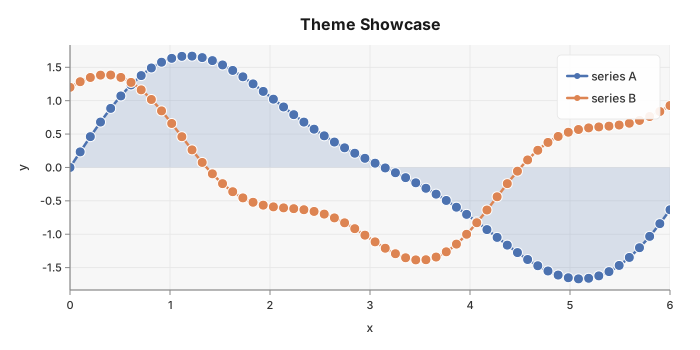
Clean white background with a light grey plot area. Left and bottom spines are shown. Uses the Classic palette — saturated but not garish. Good for reports, notebooks, and light-mode UIs.
package main

import (
	"math"

	"github.com/goplotlib/goplotlib/chart"
	"github.com/goplotlib/goplotlib/plot"
	"github.com/goplotlib/goplotlib/theme"
)

func main() {
	fig := plot.New(plot.WithWidth(700), plot.WithHeight(350), plot.WithTheme(theme.Light))
	ax := fig.AddAxes()
	ax.Line(xs, ys1, chart.LineStyle{Label: "series A", Smooth: true, Fill: true, LineWidth: 2.5})
	ax.Line(xs, ys2, chart.LineStyle{Label: "series B", Smooth: true, LineWidth: 2.5})
	ax.SetTitle("Theme Showcase").SetXLabel("x").SetYLabel("y")
}
Dark
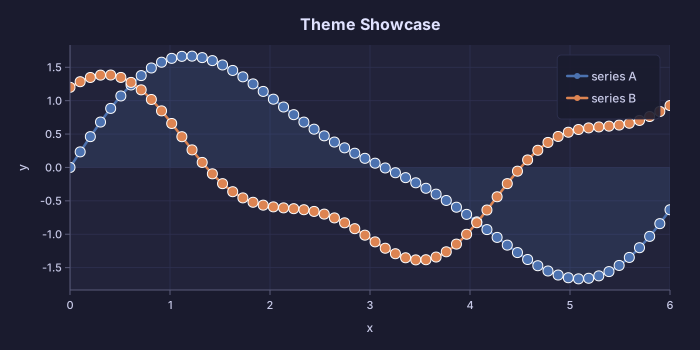
Deep navy background, matching plot area. Grid lines are subtle dark-blue stripes. Text and tick labels use a soft lavender tone. Pairs well with dashboards and dark-mode applications. Also uses the Classic palette.
package main

import (
	"math"

	"github.com/goplotlib/goplotlib/chart"
	"github.com/goplotlib/goplotlib/plot"
	"github.com/goplotlib/goplotlib/theme"
)

func main() {
	fig := plot.New(plot.WithWidth(700), plot.WithHeight(350), plot.WithTheme(theme.Dark))
	ax := fig.AddAxes()
	ax.Line(xs, ys1, chart.LineStyle{Label: "series A", Smooth: true, Fill: true, LineWidth: 2.5})
	ax.Line(xs, ys2, chart.LineStyle{Label: "series B", Smooth: true, LineWidth: 2.5})
	ax.SetTitle("Theme Showcase").SetXLabel("x").SetYLabel("y")
}
Minimal
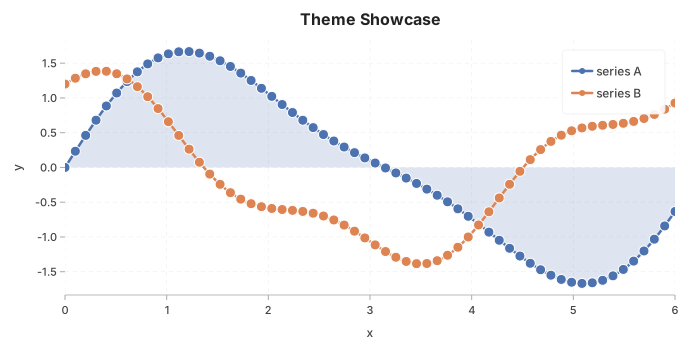
White background and plot area, no left spine — just a bottom spine. Grid lines are dashed and very light. Produces clean, presentation-style charts with minimal visual noise. Uses the Classic palette.
package main

import (
	"math"

	"github.com/goplotlib/goplotlib/chart"
	"github.com/goplotlib/goplotlib/plot"
	"github.com/goplotlib/goplotlib/theme"
)

func main() {
	fig := plot.New(plot.WithWidth(700), plot.WithHeight(350), plot.WithTheme(theme.Minimal))
	ax := fig.AddAxes()
	ax.Line(xs, ys1, chart.LineStyle{Label: "series A", Smooth: true, Fill: true, LineWidth: 2.5})
	ax.Line(xs, ys2, chart.LineStyle{Label: "series B", Smooth: true, LineWidth: 2.5})
	ax.SetTitle("Theme Showcase").SetXLabel("x").SetYLabel("y")
}
FiveThirtyEight
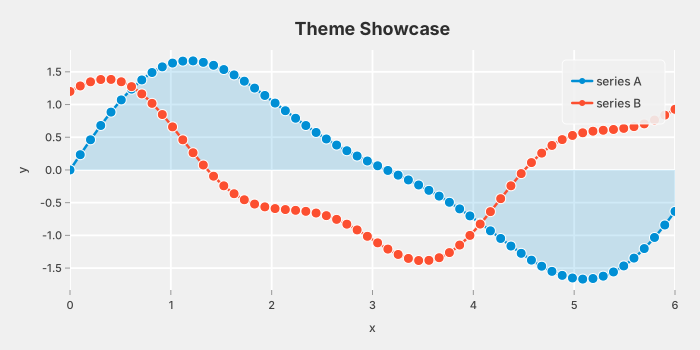
Inspired by the data journalism style of FiveThirtyEight. Grey background, bold white grid lines (no spines), larger title font. Uses the FTEPalette — bright, high-contrast colours that read well at small sizes.
package main

import (
	"math"

	"github.com/goplotlib/goplotlib/chart"
	"github.com/goplotlib/goplotlib/plot"
	"github.com/goplotlib/goplotlib/theme"
)

func main() {
	fig := plot.New(plot.WithWidth(700), plot.WithHeight(350), plot.WithTheme(theme.FiveThirtyEight))
	ax := fig.AddAxes()
	ax.Line(xs, ys1, chart.LineStyle{Label: "series A", Smooth: true, Fill: true, LineWidth: 2.5})
	ax.Line(xs, ys2, chart.LineStyle{Label: "series B", Smooth: true, LineWidth: 2.5})
	ax.SetTitle("Theme Showcase").SetXLabel("x").SetYLabel("y")
}
Palette colors
| Palette | Colors |
|---|---|
| Classic (Light, Dark, Minimal) | #4C72B0 #DD8452 #55A868 #C44E52 #8172B3 #937860 #DA8BC3 #8C8C8C #CCB974 #64B5CD |
| FTEPalette (FiveThirtyEight) | #008fd5 #fc4f30 #e5ae38 #6d904f #8b8b8b #810f7c |
You can override any series color by setting the Color field in the chart’s style struct:
ax.Line(xs, ys, chart.LineStyle{Color: color.Parse("#hex")})