Getting Started
Installation
Add goplotlib to your Go module:
go get github.com/goplotlib/goplotlibNo additional dependencies are required. The library uses only the Go standard library.
Minimal working example
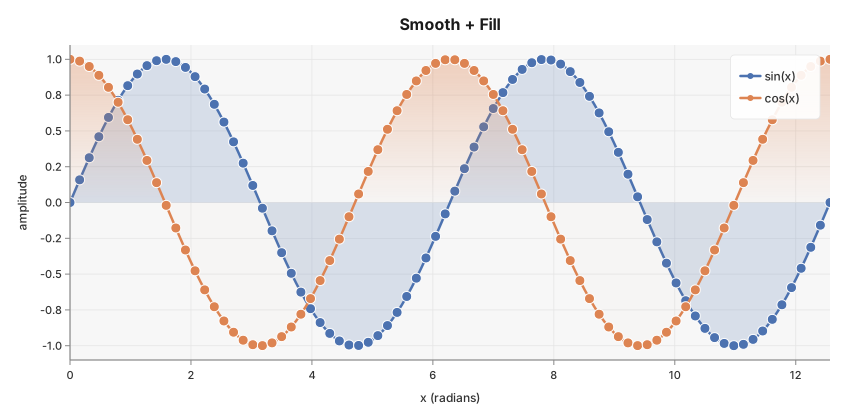
The following program produces a smoothed, gradient-filled line chart of sin(x) and cos(x)
and saves it as an SVG file.
package main

import (
	"math"

	"github.com/goplotlib/goplotlib/chart"
	"github.com/goplotlib/goplotlib/plot"
)

func main() {
	// Build x values and compute sin/cos
	n := 80
	xs := make([]float64, n)
	sinY := make([]float64, n)
	cosY := make([]float64, n)
	for i := range xs {
		xs[i] = float64(i) * 4 * math.Pi / float64(n-1)
		sinY[i] = math.Sin(xs[i])
		cosY[i] = math.Cos(xs[i])
	}

	// Create the figure (860×420 px, default Light theme)
	fig := plot.New(plot.WithWidth(860), plot.WithHeight(420))
	ax := fig.AddAxes()

	ax.Line(xs, sinY, chart.LineStyle{Label: "sin(x)", Smooth: true, Fill: true})
	ax.Line(xs, cosY, chart.LineStyle{Label: "cos(x)", Smooth: true, Fill: true})

	ax.SetTitle("Trigonometric Functions").
		SetXLabel("x (radians)").
		SetYLabel("amplitude")

	fig.SaveSVG("output.svg")
}
Rendered output
Three core concepts
goplotlib is built around three composable types:
Figure — the top-level canvas. It owns the pixel dimensions and the visual theme.
Create one with plot.New(...).
Axes — a single plot area inside the figure. It manages scales, grid lines, axis labels,
and the legend. Retrieve one by calling fig.AddAxes(). You can call AddAxes() multiple
times to create a multi-panel layout.
Chart — a single data series added to an Axes. Each Axes method (Line, Bar,
Scatter) creates and registers a chart internally and returns the Axes for method chaining.
The typical flow is always:
fig := plot.New(...)          // 1. Create a Figure
ax  := fig.AddAxes()          // 2. Add an Axes
ax.Line(xs, ys, ...)          // 3. Add one or more series
fig.SaveSVG("chart.svg")      // 4. Render and save
Figure title
Pass plot.WithTitle(...) to show a title above all axes — distinct from the per-axes title set
with ax.SetTitle(...). When a figure title is present, goplotlib automatically adds extra top
padding so the two titles never overlap.
fig := plot.New(
    plot.WithWidth(900),
    plot.WithHeight(500),
    plot.WithTitle("Q3 Performance Report"),
)
ax := fig.AddAxes()
ax.SetTitle("Revenue vs Target")
Axis limits
By default, goplotlib auto-ranges each axis from the data. Use SetXLim / SetYLim to pin
one or both bounds. Pass plot.Auto for a bound you want to keep auto-ranged.
// Zoom into x ∈ [0, 6.3] and clamp y to ±1
ax.SetXLim(0, 6.3)
ax.SetYLim(-1.0, 1.0)

// Pin only the upper y bound
ax.SetYLim(plot.Auto, 100)
Data outside the fixed range is clipped by the plot area boundary — no special handling needed.