Step Chart
When to use
Step charts are ideal for:
- Cumulative distribution functions (CDFs) where values change instantaneously.
- Event logs or state machines where a value holds constant until the next event.
- Price or rate data that changes only at discrete intervals (e.g. interest rates, fee tiers).
Use ax.Step(xs, ys, chart.StepStyle{...}) to add a step series.
Basic example
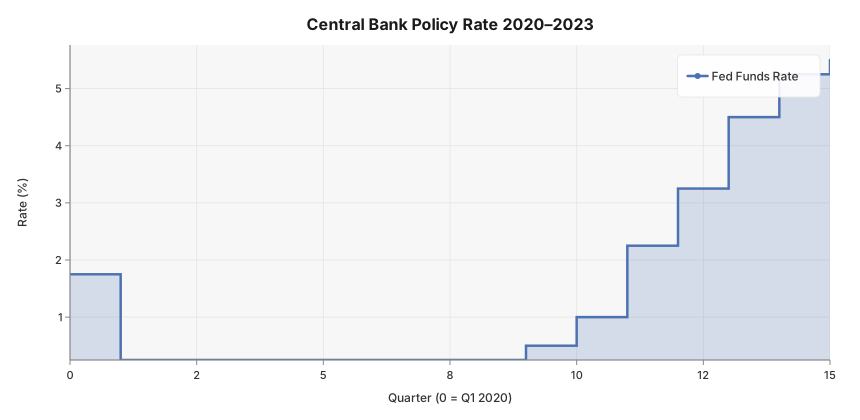
Central bank policy rate from Q1 2020 through Q4 2023 — rates held flat for quarters at a time then jumped at discrete meetings, which is exactly what a step chart communicates.
package main

import (
	"github.com/goplotlib/goplotlib/chart"
	"github.com/goplotlib/goplotlib/plot"
)

func main() {
	// Quarter index from Q1 2020 (0) to Q4 2023 (15)
	quarter := []float64{0, 1, 2, 4, 8, 9, 10, 11, 12, 13, 14, 15}
	// Policy rate (%) — emergency cuts in 2020, hikes from 2022
	rate := []float64{1.75, 0.25, 0.25, 0.25, 0.25, 0.50, 1.00, 2.25, 3.25, 4.50, 5.25, 5.50}

	fig := plot.New(plot.WithWidth(860), plot.WithHeight(420))
	ax := fig.AddAxes()
	ax.Step(quarter, rate, chart.StepStyle{
		Label: "Fed Funds Rate",
		Fill:  true,
	})
	ax.SetTitle("Central Bank Policy Rate 2020–2023").
		SetXLabel("Quarter (0 = Q1 2020)").
		SetYLabel("Rate (%)")
}
Step modes
Control where the horizontal segment is drawn relative to the data point via the Mode field:
| Mode | Behaviour |
|---|---|
"post" (default) | Step happens after the point — value holds from xᵢ to xᵢ₊₁ |
"pre" | Step happens before the point — value changes at xᵢ |
"mid" | Step midpoint is centred between xᵢ and xᵢ₊₁ |
ax.Step(quarter, rate, chart.StepStyle{Mode: "pre"})
ax.Step(quarter, rate, chart.StepStyle{Mode: "mid"})
Style reference
chart.StepStyle fields:
| Field | Type | Default | Description |
|---|---|---|---|
Label | string | "" | Series label shown in the legend |
Color | color.Color | palette | Override the automatic palette color |
Opacity | float64 | 1.0 | Overall series opacity, 0.0–1.0 |
Mode | string | "post" | Step interpolation: "pre", "post", "mid" |
Fill | bool | false | Fill area under the step line |
LineWidth | float64 | 2.5 | Stroke width in pixels |
Dash | []float64 | none | SVG stroke-dasharray pattern |