Stacked Bar Chart
When to use
Stacked bar charts are good for:
- Showing how a total is divided into components across categories.
- Comparing both individual segments and the overall total simultaneously.
- Visualising product mix, budget breakdowns, or demographic composition.
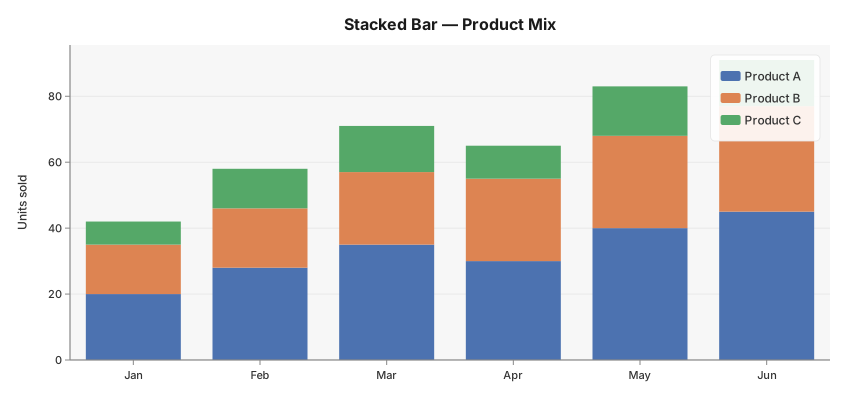
Use ax.StackedBar(categories, series, labels, opts...) where series is a slice of value slices — one per sub-group — all the same length as categories.
Basic example
package main

import (
	"github.com/goplotlib/goplotlib/chart"
	"github.com/goplotlib/goplotlib/plot"
)

func main() {
	cats := []string{"Jan", "Feb", "Mar", "Apr", "May", "Jun"}
	series := [][]float64{
		{20, 28, 35, 30, 40, 45}, // Product A
		{15, 18, 22, 25, 28, 32}, // Product B
		{7, 12, 14, 10, 15, 14},  // Product C
	}

	fig := plot.New(plot.WithWidth(860), plot.WithHeight(420))
	ax := fig.AddAxes()
	ax.StackedBar(cats, series, []string{"Product A", "Product B", "Product C"}, chart.StackedBarStyle{})
	ax.SetTitle("Stacked Bar — Product Mix").SetYLabel("Units sold")
}
Notes
- Colors are assigned automatically from the active theme’s palette — one color per sub-series.
- The
labelsslice provides legend entries for each sub-series; pass an empty slice to suppress the legend. - Y-axis always starts at 0 so the total height is visually accurate.