Stacked Area Chart
When to use
Stacked area charts are good for:
- Visualising how multiple series contribute to a total over time.
- Showing trends in composition (e.g. web traffic by device, revenue by product line).
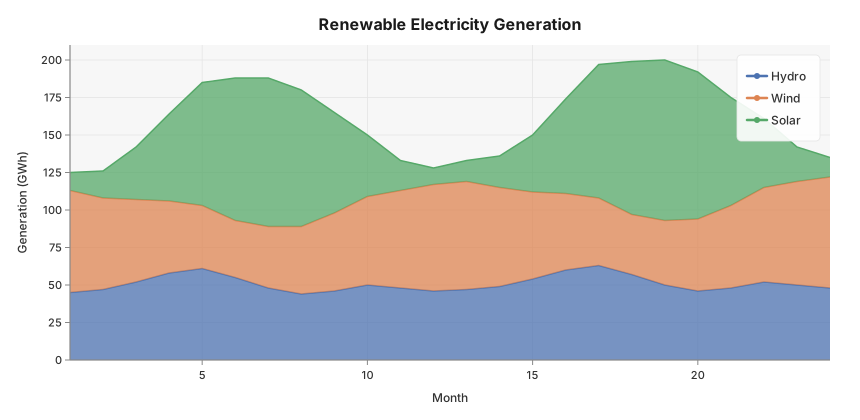
Use ax.StackedArea(xs, series, labels) where series is a slice of value slices — one per band — all the same length as xs.
Basic example
Monthly renewable electricity generation (GWh) by source over two years, showing how the mix shifts with seasons — solar peaks in summer, wind in winter.
package main

import (
	"github.com/goplotlib/goplotlib/plot"
)

func main() {
	// Month index 1–24 (Jan Y1 → Dec Y2)
	months := make([]float64, 24)
	for i := range months {
		months[i] = float64(i + 1)
	}

	// Generation in GWh — seasonal patterns visible
	solar := []float64{
		12, 18, 35, 58, 82, 95, 99, 91, 67, 41, 20, 11,
		14, 21, 38, 63, 89, 102, 107, 98, 72, 46, 23, 13,
	}
	wind := []float64{
		68, 61, 55, 48, 42, 38, 41, 45, 52, 59, 65, 71,
		72, 66, 58, 51, 45, 40, 43, 48, 55, 63, 69, 74,
	}
	hydro := []float64{
		45, 47, 52, 58, 61, 55, 48, 44, 46, 50, 48, 46,
		47, 49, 54, 60, 63, 57, 50, 46, 48, 52, 50, 48,
	}

	fig := plot.New(plot.WithWidth(860), plot.WithHeight(420))
	ax := fig.AddAxes()
	ax.StackedArea(months, [][]float64{hydro, wind, solar},
		[]string{"Hydro", "Wind", "Solar"},
	)
	ax.SetTitle("Renewable Electricity Generation").
		SetXLabel("Month").
		SetYLabel("Generation (GWh)")
}
Notes
- Colors are assigned automatically from the active theme’s palette — one color per band.
- Each band is filled with 80 % opacity and a matching stroke.
- The stacking order follows the order of
series— first slice is at the bottom.