Scatter Plot
When to use
Scatter plots are the right tool for:
- Exploring the correlation or distribution between two numeric variables.
- Displaying clustered or grouped data with each group as a separate series.
- Identifying outliers in a dataset.
Use ax.Scatter(xs, ys, chart.ScatterStyle{...}) to add a scatter series.
Basic example with two series
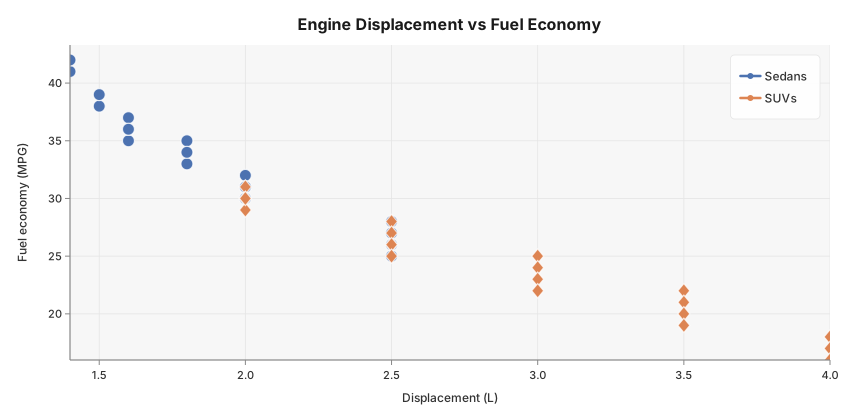
Engine displacement vs fuel economy for sedans and SUVs — the negative correlation (larger engines → lower MPG) is immediately visible, and the two segments cluster clearly.
package main

import (
	"github.com/goplotlib/goplotlib/chart"
	"github.com/goplotlib/goplotlib/plot"
)

func main() {
	// Engine displacement (L) vs fuel economy (MPG)
	sedanDisp := []float64{1.5, 1.6, 2.0, 1.8, 2.5, 1.4, 2.0, 1.6, 2.5, 1.8,
		1.5, 2.0, 1.6, 2.5, 1.8, 1.4, 2.0, 1.6, 1.8, 2.5}
	sedanMPG := []float64{38, 35, 32, 34, 28, 41, 31, 36, 27, 33,
		39, 30, 37, 26, 35, 42, 31, 36, 34, 25}

	suvDisp := []float64{2.5, 3.5, 2.0, 3.0, 2.5, 4.0, 3.5, 2.5, 3.0, 2.0,
		3.5, 4.0, 2.5, 3.0, 2.0, 3.5, 4.0, 2.5, 3.0, 2.0}
	suvMPG := []float64{28, 22, 31, 25, 26, 18, 21, 27, 24, 30,
		20, 17, 26, 23, 29, 19, 16, 25, 22, 30}

	fig := plot.New(plot.WithWidth(860), plot.WithHeight(420))
	ax := fig.AddAxes()
	ax.Scatter(sedanDisp, sedanMPG, chart.ScatterStyle{
		Label:      "Sedans",
		MarkerSize: 6,
	})
	ax.Scatter(suvDisp, suvMPG, chart.ScatterStyle{
		Label:       "SUVs",
		MarkerShape: "diamond",
		MarkerSize:  6,
	})
	ax.SetTitle("Engine Displacement vs Fuel Economy").
		SetXLabel("Displacement (L)").
		SetYLabel("Fuel economy (MPG)")
}
Style reference
chart.ScatterStyle fields:
| Field | Type | Default | Description |
|---|---|---|---|
Label | string | "" | Series label shown in the legend |
Color | color.Color | palette | Override the automatic palette color |
Opacity | float64 | 1.0 | Overall marker opacity, 0.0–1.0 |
MarkerSize | float64 | 5 | Marker radius in pixels |
MarkerShape | string | "circle" | "circle", "square", "diamond", "triangle" |
Notes
- Each marker is rendered with a thin white border to improve separation when points overlap.
MarkerSizeis the radius for circles and the half-side for squares; diamond and triangle use the same value as an approximate radius.