Line Chart
When to use
Line charts are ideal for:
- Time-series data where the trend between consecutive points is meaningful.
- Comparing two or more continuous signals on the same axes.
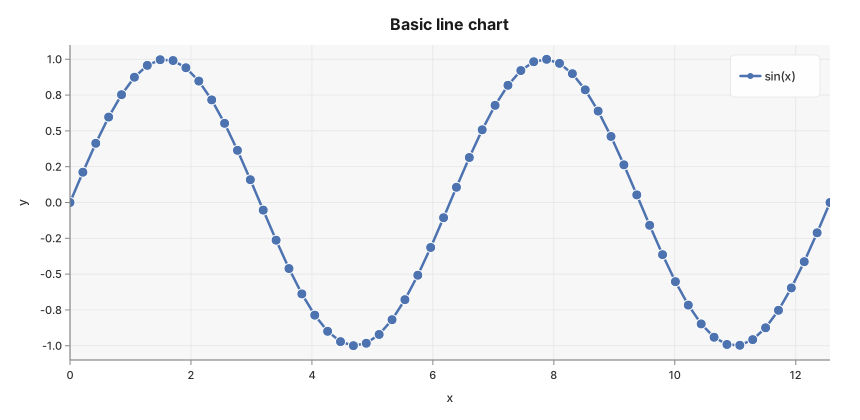
- Showing the shape of a mathematical function.
Use ax.Line(xs, ys, chart.LineStyle{...}) to add a line series. Multiple calls layer
additional series on the same plot. The method returns the *Axes for chaining.
Basic example
package main

import (
	"math"

	"github.com/goplotlib/goplotlib/chart"
	"github.com/goplotlib/goplotlib/plot"
)

func main() {
	n := 60
	xs := make([]float64, n)
	ys := make([]float64, n)
	for i := range xs {
		xs[i] = float64(i) / float64(n-1) * 4 * math.Pi
		ys[i] = math.Sin(xs[i])
	}

	fig := plot.New(plot.WithWidth(860), plot.WithHeight(420))
	ax := fig.AddAxes()
	ax.Line(xs, ys, chart.LineStyle{Label: "sin(x)"})
	ax.SetTitle("Basic line chart").SetXLabel("x").SetYLabel("y")
}
Smoothed and filled variant
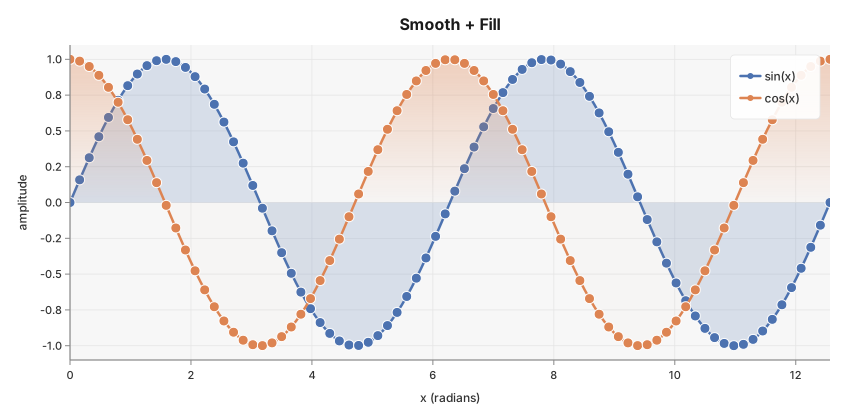
Set Smooth: true to connect points with Catmull-Rom splines instead of straight
segments. Set Fill: true to render a gradient-filled area under the line.
package main

import (
	"math"

	"github.com/goplotlib/goplotlib/chart"
	"github.com/goplotlib/goplotlib/plot"
)

func main() {
	n := 80
	xs := make([]float64, n)
	sinY := make([]float64, n)
	cosY := make([]float64, n)
	for i := range xs {
		xs[i] = float64(i) * 4 * math.Pi / float64(n-1)
		sinY[i] = math.Sin(xs[i])
		cosY[i] = math.Cos(xs[i])
	}

	fig := plot.New(plot.WithWidth(860), plot.WithHeight(420))
	ax := fig.AddAxes()
	ax.Line(xs, sinY, chart.LineStyle{
		Label:       "sin(x)",
		Smooth:      true,
		Fill:        true,
		FillOpacity: 0.2,
	})
	ax.Line(xs, cosY, chart.LineStyle{
		Label:       "cos(x)",
		Smooth:      true,
		Fill:        true,
		FillOpacity: 0.2,
	})
	ax.SetTitle("Smooth + Fill").SetXLabel("x (radians)").SetYLabel("amplitude")
}
Dashed line variant
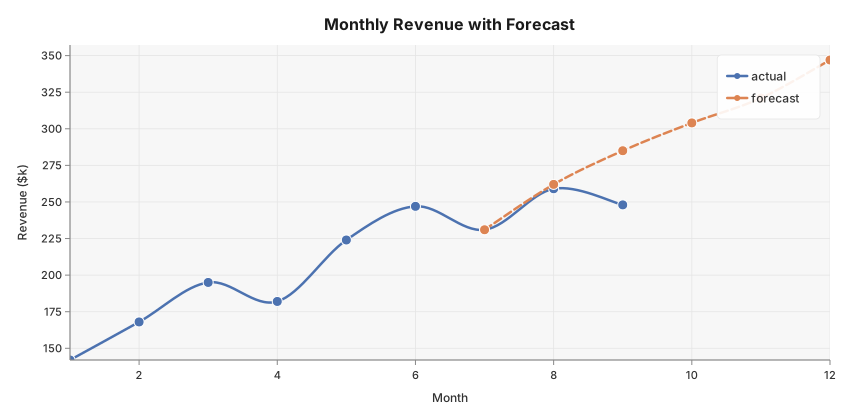
Use the Dash field to set a stroke dash pattern. The values follow the SVG
stroke-dasharray convention: alternating run lengths in pixels.
Monthly revenue with a three-month forecast extension shown as a dashed line.
package main

import (
	"github.com/goplotlib/goplotlib/chart"
	"github.com/goplotlib/goplotlib/plot"
)

func main() {
	// Months 1–9: actuals; months 7–12: forecast (overlap at handoff)
	xActual   := []float64{1, 2, 3, 4, 5, 6, 7, 8, 9}
	yActual   := []float64{142, 168, 195, 182, 224, 247, 231, 259, 248}
	xForecast := []float64{7, 8, 9, 10, 11, 12}
	yForecast := []float64{231, 262, 285, 304, 321, 347}

	fig := plot.New(plot.WithWidth(860), plot.WithHeight(420))
	ax := fig.AddAxes()
	ax.Line(xActual, yActual, chart.LineStyle{
		Label:  "actual",
		Smooth: true,
	})
	ax.Line(xForecast, yForecast, chart.LineStyle{
		Label:  "forecast",
		Smooth: true,
		Dash:   []float64{8, 4}, // 8px on, 4px off
	})
	ax.SetTitle("Monthly Revenue with Forecast").SetXLabel("Month").SetYLabel("Revenue ($k)")
}
Markers
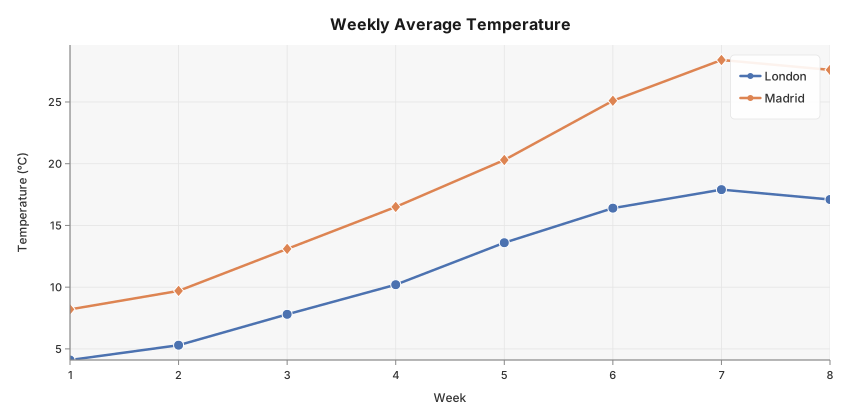
Set MarkerSize to draw a shape at each data point. Choose the shape with MarkerShape.
Supported shapes: "circle" (default), "square", "diamond", "triangle".
package main

import (
	"github.com/goplotlib/goplotlib/chart"
	"github.com/goplotlib/goplotlib/plot"
)

func main() {
	// Weekly average temperature — two cities, few enough points that markers add value
	weeks  := []float64{1, 2, 3, 4, 5, 6, 7, 8}
	london := []float64{4.1, 5.3, 7.8, 10.2, 13.6, 16.4, 17.9, 17.1}
	madrid := []float64{8.2, 9.7, 13.1, 16.5, 20.3, 25.1, 28.4, 27.6}

	fig := plot.New(plot.WithWidth(860), plot.WithHeight(420))
	ax := fig.AddAxes()
	ax.Line(weeks, london, chart.LineStyle{
		Label:       "London",
		MarkerShape: "circle",
		MarkerSize:  5,
	})
	ax.Line(weeks, madrid, chart.LineStyle{
		Label:       "Madrid",
		MarkerShape: "diamond",
		MarkerSize:  5,
	})
	ax.SetTitle("Weekly Average Temperature").SetXLabel("Week").SetYLabel("Temperature (°C)")
}
Style reference
chart.LineStyle fields:
| Field | Type | Default | Description |
|---|---|---|---|
Label | string | "" | Series label shown in the legend |
Color | color.Color | palette | Override the automatic palette color |
Opacity | float64 | 1.0 | Overall series opacity, 0.0–1.0 |
Smooth | bool | false | Catmull-Rom spline smoothing |
Fill | bool | false | Gradient area fill under the line |
FillOpacity | float64 | 0.15 | Fill opacity, 0.0–1.0 |
LineWidth | float64 | 2.5 | Stroke width in pixels |
MarkerSize | float64 | 5 | Marker radius in pixels |
MarkerShape | string | "circle" | "circle", "square", "diamond", "triangle" |
Dash | []float64 | none | SVG stroke-dasharray values |