Histogram
When to use
Histograms are useful for:
- Understanding the shape and spread of a dataset (normal, skewed, bimodal…).
- Identifying outliers and gaps in data.
- Comparing distributions before and after a transformation.
Use ax.Histogram(values, chart.HistogramStyle{...}).
Basic example
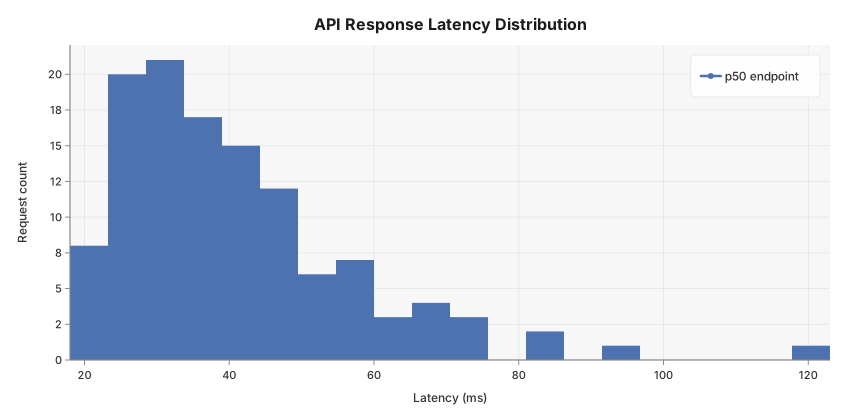
API response latency measured across 120 production requests — a classic right-skewed distribution with a long tail of slow outliers.
package main

import (
	"github.com/goplotlib/goplotlib/chart"
	"github.com/goplotlib/goplotlib/plot"
)

func main() {
	// API endpoint response times (ms) — 120 production samples
	latency := []float64{
		18, 22, 19, 31, 25, 28, 23, 34, 27, 21,
		29, 41, 24, 33, 26, 39, 30, 45, 22, 37,
		32, 48, 27, 56, 35, 43, 29, 38, 52, 24,
		47, 36, 61, 28, 44, 33, 57, 31, 42, 25,
		68, 39, 29, 50, 36, 23, 45, 74, 31, 41,
		26, 53, 38, 30, 47, 34, 63, 28, 43, 37,
		82, 32, 49, 27, 55, 40, 35, 66, 29, 46,
		24, 58, 33, 44, 71, 30, 51, 38, 27, 48,
		92, 36, 43, 25, 62, 34, 47, 29, 55, 39,
		28, 75, 32, 46, 24, 59, 37, 43, 31, 52,
		21, 84, 35, 48, 26, 67, 33, 44, 28, 57,
		123, 38, 29, 53, 36, 42, 31, 46, 24, 68,
	}

	fig := plot.New(plot.WithWidth(860), plot.WithHeight(420))
	ax := fig.AddAxes()
	ax.Histogram(latency, chart.HistogramStyle{Label: "p50 endpoint", Bins: 20})
	ax.SetTitle("API Response Latency Distribution").
		SetXLabel("Latency (ms)").
		SetYLabel("Request count")
}
Bin control
By default the number of bins is chosen automatically via Sturges’ rule (k = ⌈log₂(n) + 1⌉). You can override this:
// Fixed number of bins
ax.Histogram(latency, chart.HistogramStyle{Bins: 30})

// Explicit bin edges — useful for SLA buckets
ax.Histogram(latency, chart.HistogramStyle{
	BinEdges: []float64{0, 25, 50, 100, 200, 500},
})
Density and cumulative modes
// Normalise so the total area equals 1 (probability density)
ax.Histogram(latency, chart.HistogramStyle{Normalize: true})

// Cumulative count / density
ax.Histogram(latency, chart.HistogramStyle{Cumulative: true})

// Both together — cumulative density function (CDF)
ax.Histogram(latency, chart.HistogramStyle{Normalize: true, Cumulative: true})
Style reference
chart.HistogramStyle fields:
| Field | Type | Default | Description |
|---|---|---|---|
Label | string | "" | Series label shown in the legend |
Color | color.Color | palette | Override the automatic palette color |
Opacity | float64 | 1.0 | Overall bar opacity, 0.0–1.0 |
Bins | int | auto | Number of equal-width bins (0 = Sturges’ rule) |
BinEdges | []float64 | — | Explicit bin edges (overrides Bins) |
Normalize | bool | false | Normalise to density (area = 1) |
Cumulative | bool | false | Show cumulative count or density |