Heatmap
When to use
Heatmaps are good for:
- Correlation matrices between many variables.
- Activity data over a two-dimensional grid (day × hour, row × column).
- Confusion matrices and cross-tabulations.
Use ax.Heatmap(matrix, chart.HeatmapStyle{...}) where matrix[row][col] is the scalar value for that cell.
Basic example
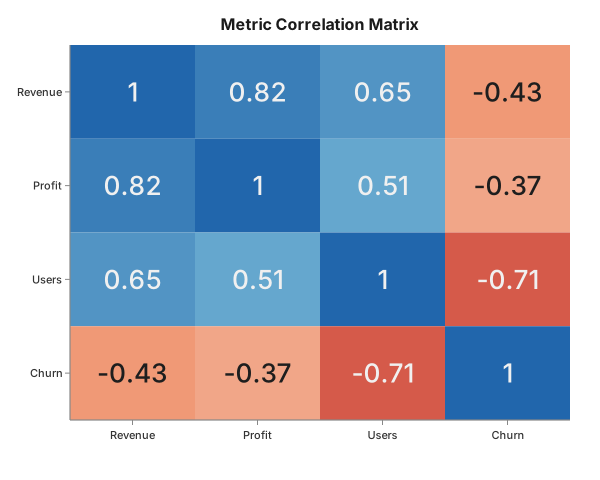
Pairwise correlation matrix for four business metrics — positive correlations in warm colours, the negative churn correlation in cool.
package main

import (
	"github.com/goplotlib/goplotlib/chart"
	"github.com/goplotlib/goplotlib/colormap"
	"github.com/goplotlib/goplotlib/plot"
)

func main() {
	// Pearson correlations: Revenue, Profit, Active Users, Churn Rate
	matrix := [][]float64{
		{ 1.00,  0.82,  0.65, -0.43},
		{ 0.82,  1.00,  0.51, -0.37},
		{ 0.65,  0.51,  1.00, -0.71},
		{-0.43, -0.37, -0.71,  1.00},
	}
	labels := []string{"Revenue", "Profit", "Users", "Churn"}

	fig := plot.New(plot.WithWidth(600), plot.WithHeight(480))
	ax := fig.AddAxes()
	ax.Heatmap(matrix, chart.HeatmapStyle{
		RowLabels:      labels,
		ColLabels:      labels,
		ColorMap:       colormap.RdBu,
		DivergingScale: true,
		CellLabels:     true,
	})
	ax.SetTitle("Metric Correlation Matrix")
}
Colourmaps
Import "github.com/goplotlib/goplotlib/colormap" and pass one of the built-in maps:
| Constant | Description |
|---|---|
colormap.Viridis | Perceptually uniform, blue → green → yellow |
colormap.Plasma | Blue → purple → orange |
colormap.Greys | White → black (sequential) |
colormap.Blues | White → dark blue (sequential) |
colormap.RdBu | Red → white → blue (diverging) |
ax.Heatmap(matrix, chart.HeatmapStyle{
	ColorMap:       colormap.RdBu,
	DivergingScale: true,
})
Use DivergingScale: true with diverging maps to centre the colour scale at zero.
Cell labels
// Print the numeric value inside each cell
ax.Heatmap(matrix, chart.HeatmapStyle{CellLabels: true})
Text colour is automatically chosen as white or dark based on cell luminance.
Style reference
chart.HeatmapStyle fields:
| Field | Type | Default | Description |
|---|---|---|---|
RowLabels | []string | index | Labels for each row (y-axis) |
ColLabels | []string | index | Labels for each column (x-axis) |
ColorMap | colormap.ColorMap | Viridis | Colour map to use |
CellLabels | bool | false | Print the numeric value inside each cell |
DivergingScale | bool | false | Centre normalisation at zero (for diverging maps) |