Bubble Chart
When to use
Bubble charts extend scatter plots with a third dimension encoded as the radius of each marker. They work well for:
- Comparing entities on three numeric axes simultaneously (e.g. revenue, growth, market size).
- Showing proportional quantities that don’t fit neatly on an axis.
Use ax.Bubble(xs, ys, sizes, chart.BubbleStyle{...}). All three slices must have equal length.
Basic example
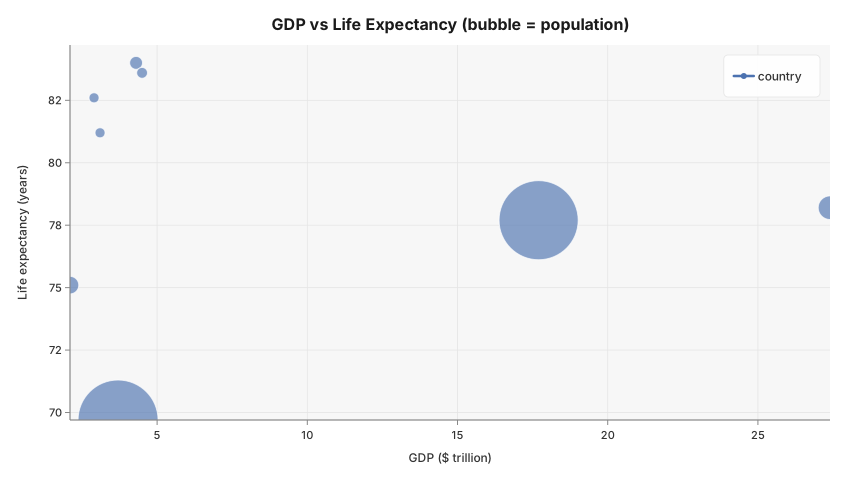
GDP vs life expectancy vs population for eight major economies — the classic bubble chart. Bubble area encodes population size.
package main

import (
	"github.com/goplotlib/goplotlib/chart"
	"github.com/goplotlib/goplotlib/plot"
)

func main() {
	// Countries: USA, China, Germany, Japan, India, UK, France, Brazil
	gdp     := []float64{27.4, 17.7, 4.5, 4.3, 3.7, 3.1, 2.9, 2.1} // $ trillion
	lifeExp := []float64{78.2, 77.7, 83.6, 84.0, 69.7, 81.2, 82.6, 75.1} // years
	pop     := []float64{333, 1411, 84, 124, 1428, 68, 68, 215} // millions

	fig := plot.New(plot.WithWidth(860), plot.WithHeight(480))
	ax := fig.AddAxes()
	ax.Bubble(gdp, lifeExp, pop, chart.BubbleStyle{
		Label:   "country",
		Opacity: 0.7,
		SizeMin: 5,
		SizeMax: 40,
	})
	ax.SetTitle("GDP vs Life Expectancy (bubble = population)").
		SetXLabel("GDP ($ trillion)").
		SetYLabel("Life expectancy (years)")
}
Size scaling
SizeMin and SizeMax map the raw sizes values linearly to pixel radii in [SizeMin, SizeMax].
Larger bubbles are drawn first so smaller ones are never hidden behind them.
ax.Bubble(gdp, lifeExp, pop, chart.BubbleStyle{SizeMin: 4, SizeMax: 40})Per-point labels
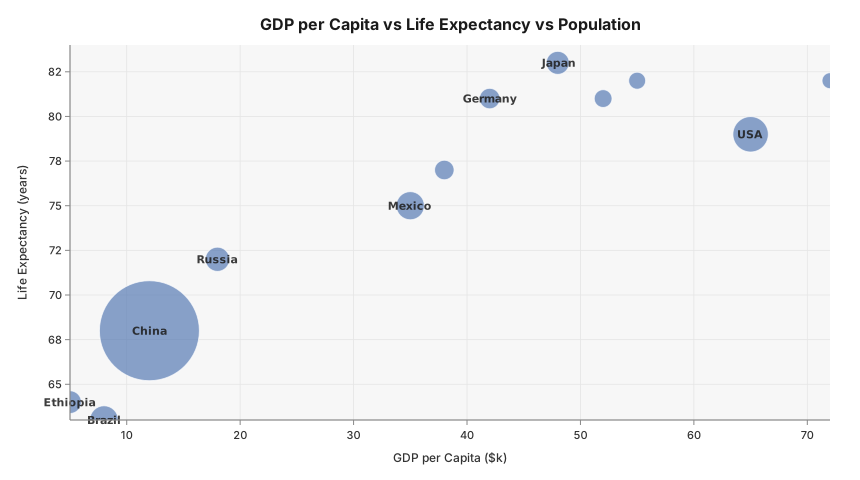
Pass a Labels slice to draw a text label centered inside each bubble. Labels are
automatically skipped for bubbles that are too small to fit the text.
package main

import (
	"github.com/goplotlib/goplotlib/chart"
	"github.com/goplotlib/goplotlib/plot"
)

func main() {
	gdp  := []float64{65, 48, 42, 38, 55, 12, 8, 18, 72, 52, 35, 5}
	life := []float64{79, 83, 81, 77, 82, 68, 63, 72, 82, 81, 75, 64}
	pop  := []float64{330, 125, 83, 67, 25, 1400, 215, 145, 8, 38, 210, 120}
	labels := []string{
		"USA", "Japan", "Germany", "France", "UK",
		"China", "Brazil", "Russia", "Switz.", "Spain", "Mexico", "Ethiopia",
	}
	fig := plot.New(plot.WithWidth(860), plot.WithHeight(480))
	ax := fig.AddAxes()
	ax.Bubble(gdp, life, pop, chart.BubbleStyle{SizeMin: 8, SizeMax: 50, Labels: labels})
	ax.SetTitle("GDP per Capita vs Life Expectancy vs Population").
		SetXLabel("GDP per Capita ($k)").SetYLabel("Life Expectancy (years)")
}
Style reference
chart.BubbleStyle fields:
| Field | Type | Default | Description |
|---|---|---|---|
Label | string | "" | Series label shown in the legend |
Color | color.Color | palette | Override the automatic palette color |
Opacity | float64 | 1.0 | Overall series opacity (fill capped at 0.65) |
SizeMin | float64 | 4 | Minimum pixel radius for bubbles |
SizeMax | float64 | 30 | Maximum pixel radius for bubbles |
Labels | []string | nil | Per-point labels drawn inside each bubble; skipped when the bubble is too small |