Box Plot
When to use
Box plots are ideal for:
- Comparing distributions between multiple groups.
- Identifying median, spread, and outliers at a glance.
- Scientific experiments, A/B tests, and benchmarking.
Use ax.Box(groups, chart.BoxStyle{...}) where groups is a slice of value slices — one per group.
Basic example
package main

import (
	"github.com/goplotlib/goplotlib/chart"
	"github.com/goplotlib/goplotlib/plot"
)

func main() {
	groups := [][]float64{
		{12, 15, 14, 10, 18, 22, 9, 16, 13, 20},
		{25, 28, 22, 30, 35, 20, 27, 32, 24, 29},
		{8,  11,  9, 14,  7, 12, 10, 15,  6, 13},
	}

	fig := plot.New(plot.WithWidth(860), plot.WithHeight(420))
	ax := fig.AddAxes()
	ax.Box(groups, chart.BoxStyle{
		Labels: []string{"Control", "Treatment A", "Treatment B"},
	})
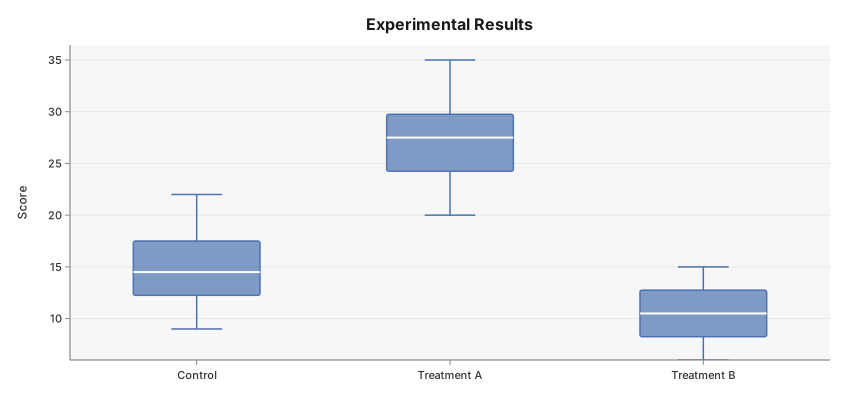
	ax.SetTitle("Experimental Results").SetYLabel("Score")
}
Visual elements
Each box encodes the following statistics computed using linear interpolation:
| Element | Value |
|---|---|
| Box bottom | Q1 (25th percentile) |
| White centre line | Median (Q2) |
| Box top | Q3 (75th percentile) |
| Whisker ends | Most extreme value within Q1 − 1.5 × IQR and Q3 + 1.5 × IQR |
| Circles | Outliers outside the 1.5 × IQR fences |
Style reference
chart.BoxStyle fields:
| Field | Type | Default | Description |
|---|---|---|---|
Label | string | "" | Legend label for the series |
Color | color.Color | palette | Override the automatic palette color |
Labels | []string | index | Per-group x-axis category labels |